Key takeaways
- Discover the best ergonomic mesh office chairs for creative workstations, with breathable mesh backs, adjustable lumbar support, and all-day comfort.
Creative work asks a lot of a chair. A designer sketching concepts, a video editor cutting footage, an illustrator working through a long revision, or a writer shaping a draft can all spend six, eight, or ten hours in the same seat without really noticing — until the lower back starts to ache, the shoulders creep toward the ears, and the legs go numb. The best ergonomic mesh office chairs for creative workstations are built for exactly that kind of day: long, focused, and full of small shifts in posture as attention moves between a drawing tablet, a keyboard, a monitor, and a notebook.
Mesh is the material that makes the difference for creative work. A mesh back lets air move across the spine instead of trapping heat against it, so the chair stays comfortable through a warm afternoon and a deadline push alike. The flexible weave also gives a little under pressure, cradling the curve of the back rather than holding it flat against a rigid panel. When that mesh is paired with real ergonomic adjustment — lumbar support that moves, armrests that line up with the desk, a seat that slides, and a recline that locks — the chair stops being furniture and starts being part of the workstation itself.
This guide walks through what to look for in a mesh chair for creative work, then compares four strong options for different bodies and studio setups.
How to Choose
1. Mesh Quality and Breathability
Not all mesh is equal. Look for a tightly woven, high-density mesh that feels firm and springy when you press it, not loose or saggy. Good mesh supports the back without creating pressure points, and it keeps air circulating so the chair stays cool during long sessions.
2. Lumbar Support That Actually Adjusts
Lumbar support is the single most important ergonomic feature in a chair for creative work, and fixed lumbar support is rarely enough. Bodies differ, and so does the way people sit: an illustrator leaning forward over a tablet needs support in a different spot than an editor leaning back to watch a playback. Look for lumbar support that moves up and down and, ideally, in and out, so it can be positioned exactly against the natural curve of the lower back. Some chairs use a dedicated lumbar pad, while others build the support into a shaped section of the mesh back. Either approach can work well, as long as the support is adjustable and stays where you put it.
3. Armrests That Match the Work
Creative workstations involve more than typing. A designer may rest a forearm on the desk while using a stylus, a video editor may keep hands on a keyboard and a control surface, and a writer may alternate between a laptop and a notebook. Armrests should adjust in height at minimum, and ideally in depth and angle as well, so the forearms stay supported without the shoulders hunching. Flip-up armrests are a useful extra for creative setups: they swing out of the way when you need to pull close to a drawing tablet or slide the chair fully under a desk.
4. Seat Depth, Height, and Tilt
A chair that fits is a chair that disappears. Seat height should adjust so the feet rest flat on the floor with the knees at roughly a right angle, and the seat pan should be deep enough to support the thighs without pressing into the back of the knees. Some chairs include a sliding seat, which lets taller and shorter users each find the right depth — a real advantage in a shared studio where several people use the same workstation. Tilt matters too: a recline that locks at several angles lets you lean back to think, watch a render, or take a phone call, then return upright to work.
5. Headrest and Neck Support
A headrest is easy to overlook until the end of a long day, when the neck and upper shoulders carry the tension of hours of screen work. An adjustable headrest that moves up and down and tilts to meet the back of the head gives the neck a place to rest during pauses, phone calls, and playback sessions. It is especially valuable for taller users, whose heads sit above the top of a standard mid-back chair. If your creative work involves frequent leaning back — watching footage back, presenting to a client over video, or simply thinking through a problem — a headrest turns those pauses into genuine rest instead of more strain.
6. Weight Capacity, Base, and Build Quality
A chair for a creative workstation needs to hold up to daily use, rolling across the floor, and constant small adjustments. Check the weight capacity and make sure it comfortably covers the intended user, with margin to spare. A five-spoke base made from aluminum or reinforced nylon, smooth-rolling casters, and a gas lift cylinder rated for the chair’s capacity are all signs of a build that will last. Rollerblade-style wheels are a bonus in a studio, since they glide quietly across hard floors and protect the surface underneath. Finally, check the warranty length: it signals how far the manufacturer stands behind the frame, the mesh, and the moving parts.
Top Picks
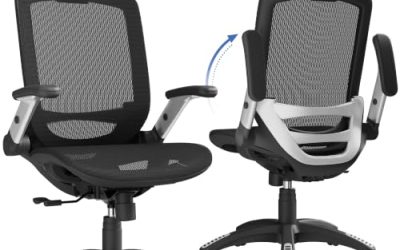
Duramont Ergonomic Office Chair
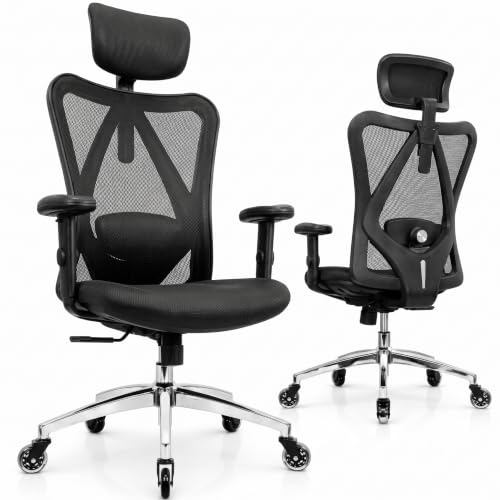
Duramont Ergonomic Office Chair
The Duramont is a high-back mesh chair built around adjustability, and it is a strong fit for a creative workstation where one chair serves long, varied days. Its breathable mesh back keeps air moving across the spine, while the thick memory foam seat cushion adds padding that mesh-only seats sometimes lack. The standout feature is the 4D lumbar support, which moves up, down, in, and out, so the lower-back pad can be dialed in to match the curve of the spine precisely rather than sitting at a fixed height that suits only some bodies.
The chair also includes an adjustable headrest, flip-up armrests, and a backrest that reclines to 120 degrees with adjustable tilt tension, so it shifts easily between upright focus work and a leaned-back pause. Rollerblade wheels glide smoothly across studio floors, and the reinforced aluminum base supports up to 330 pounds. Duramont backs the chair with a five-year warranty, which is generous for this class of chair and speaks to the build quality of the frame and mechanism.
Who it is for: illustrators, editors, and writers who want deep adjustability and a padded seat in a mesh-back chair, and anyone whose lower back needs lumbar support that can be positioned exactly. Caveats: the chair requires self-assembly out of the box, so set aside time and a clear floor space before the first session. The mesh back is firm and breathable rather than plush, so sitters who prefer a fully upholstered back may find it less cushioned than a traditional executive chair.
Hbada E3 Air Ergonomic Office Chair

Hbada E3 Air Ergonomic Office Chair
The Hbada E3 Air is a modern mesh chair designed for long hours at a desk, with a three-zone dynamic lumbar system that adapts to the shape of the lower back as posture changes through the day. Instead of a single fixed pad, the lumbar support is split into zones that flex independently, which suits creative work well: leaning forward to sketch, sitting upright to type, and leaning back to watch a playback all place different demands on the lower back, and the support shifts with those movements.
The chair uses a breathable mesh back and seat, a 3D adjustable headrest, and 3D adjustable armrests, so the main contact points can each be tuned to the user. The backrest tilts to 140 degrees, giving a deep recline for breaks between tasks. The grey finish and clean lines suit a design studio or a home creative space where the chair is part of the room’s look as well as its function.
Who it is for: designers and editors who change posture often and want lumbar support that moves with them, and anyone setting up a light, modern-looking creative workstation. Caveats: this version comes without a footrest, so sitters who like to stretch out with their feet up during breaks will need to look elsewhere. The mesh seat is firmer than a thick foam cushion, which some users love for support and others may find takes a few days to get used to.
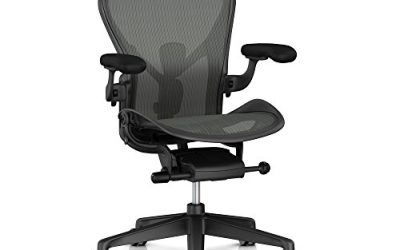
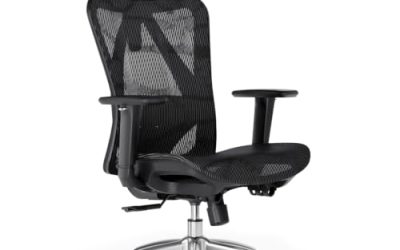
Nouhaus Ergo3D Ergonomic Office Chair

Nouhaus Ergo3D Ergonomic Office Chair
The Nouhaus Ergo3D is a long-standing mesh chair with a reputation for solid ergonomics at a mid-range position, and it brings a full set of adjustments to a creative workstation. Its mesh back and seat keep air flowing, while the 3D lumbar support and 4D adjustable armrests let the chair be tuned to the sitter’s height, reach, and posture. The adjustable headrest supports the neck during long editing sessions, and the chair reclines to 135 degrees on a synchro-tilt mechanism that keeps the body balanced as the back moves.
The Ergo3D suits users between about 5 feet 4 inches and 6 feet 1 inch tall, with a weight capacity of 275 pounds, and its blade-style wheels roll smoothly across hard floors. The black mesh and understated frame fit easily into a professional studio or a home office without drawing attention away from the work itself. Assembly is straightforward, and the chair’s mechanism feels solid and deliberate rather than loose or wobbly.
Who it is for: creative professionals who want a proven, fully adjustable mesh chair with a balanced recline and a clean, professional look. Caveats: the 275-pound weight capacity is lower than some chairs in this guide, so larger users should check it against their needs. The lumbar support, while adjustable, is built into the backrest shape rather than a separate pad, so sitters who want a pronounced, independently moving lumbar cushion may prefer a chair with a dedicated pad.
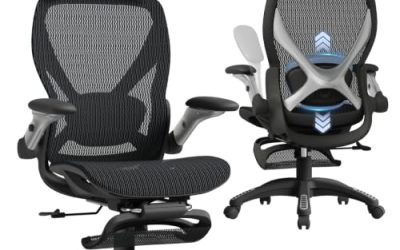
COLAMY Ergonomic Mesh Office Chair with Footrest
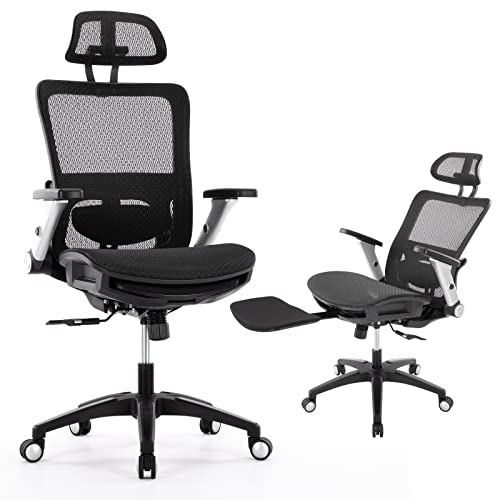
COLAMY Ergonomic Mesh Office Chair with Footrest
The COLAMY is the pick for creative workstations where long sessions are broken up by real rest. Its high-back mesh design includes a retractable footrest, so the chair converts into a recliner for breaks: extend the footrest, lean back, and let the legs and lower back recover before the next stretch of work. The adjustable lumbar support, adjustable headrest, and 4D flip-up armrests cover the core ergonomic bases, and the tilt lock holds the backrest at the chosen angle.
The flip-up armrests are a practical touch for creative setups, swinging out of the way when the chair needs to slide close to a drawing tablet or tuck under a desk. The mesh back breathes well during warm studio sessions, and the high back supports the shoulders and upper back through long days. The black finish keeps the look neutral and professional.
Who it is for: video editors, animators, and writers who take real breaks at the workstation and want a footrest built into the chair, and anyone whose setup benefits from armrests that swing away. Caveats: the footrest adds moving parts and weight, so the chair is a little heavier to move around the studio than a simpler model. Sitters who never use a footrest may find the feature unnecessary, and the chair’s recline is best used for pauses rather than as a substitute for standing and stretching regularly.
Comparison Table
| Chair | Back Material | Lumbar Support | Armrests | Headrest | Recline | Footrest | Weight Capacity |
|---|---|---|---|---|---|---|---|
| Duramont Ergonomic Office Chair | Mesh back, foam seat | 4D adjustable pad | Flip-up, adjustable | Adjustable | Up to 120 degrees | No | Up to 330 pounds |
| Hbada E3 Air | Full mesh back and seat | 3-zone dynamic | 3D adjustable | 3D adjustable | Up to 140 degrees | No | Standard desk-chair capacity |
| Nouhaus Ergo3D | Full mesh back and seat | 3D, built into backrest | 4D adjustable | Adjustable | Up to 135 degrees, synchro-tilt | No | Up to 275 pounds |
| COLAMY Ergonomic Mesh Office Chair | Mesh back | Adjustable | 4D flip-up | Adjustable | Tilt lock recline | Yes, retractable | Standard desk-chair capacity |
Which One Is Right for You?
Start with your body and your work pattern, not with the feature list. If lower-back discomfort is your main concern, the Duramont’s 4D lumbar pad gives the most precise control over where support lands, and its padded seat suits long days when a firm mesh seat feels too hard. If you shift posture constantly — leaning in to draw, sitting up to type, leaning back to think — the Hbada E3 Air’s three-zone lumbar system and deep 140-degree recline adapt to those changes without constant readjustment.
If you want a proven all-rounder with a balanced synchro-tilt recline and a clean professional look, the Nouhaus Ergo3D covers every core adjustment in a single, well-built package, as long as its weight capacity fits your needs. And if your creative sessions are long enough that real breaks matter, the COLAMY’s retractable footrest turns the chair into a place to recover between tasks, which can make the difference between a sustainable workday and an exhausting one.
For shared studios, pick chairs with the widest adjustment ranges and flip-up features, since several people may use the same workstation. For a dedicated personal setup, pick the chair whose lumbar design matches your back and whose seat feel — foam cushion or full mesh — matches your preference.
Frequently Asked Questions
Is a mesh chair better than a padded chair for a creative workstation?
Mesh has a clear advantage for long creative sessions in warm rooms: it lets air circulate across the back, so heat and moisture do not build up against the spine. A mesh back also flexes slightly to follow the curve of the back, which many sitters find more supportive than a flat padded panel. Padded seats still have their place, and several mesh chairs pair a mesh back with a foam seat cushion to combine breathability with softness. For most creative workstations, a mesh back is the more comfortable option over a full working day.
How important is adjustable lumbar support for creative work?
It is one of the most important features a creative chair can have. Creative work involves constant small posture changes — leaning forward over a tablet, sitting upright to type, leaning back to watch a playback — and each posture loads the lower back differently. Adjustable lumbar support lets the chair meet the spine in each of those positions instead of supporting only one. Look for lumbar support that moves up and down at minimum, and in and out if possible, and adjust it until it fills the natural curve of the lower back without pushing the sitter forward.
Do I need a headrest on an office chair for creative work?
A headrest is not essential for everyone, but it is valuable for long sessions and for taller users. It gives the neck a resting place during pauses, phone calls, and playback, and it supports the head during reclined thinking. If your work involves frequent leaning back, or if you regularly feel tension in the neck and upper shoulders by late afternoon, an adjustable headrest is worth having.
How do I set up a mesh ergonomic chair for a creative workstation?
Start with seat height: adjust it so the feet rest flat on the floor and the knees sit at roughly a right angle. Next, position the lumbar support against the curve of the lower back, then set the armrests so the forearms rest level with the desk without lifting the shoulders. Adjust the headrest to meet the back of the head, and set the tilt tension so the recline feels controlled rather than loose. Finally, check the distance to the desk: the chair should let you sit close enough that the elbows stay near the body while reaching the keyboard, tablet, or control surface. Revisit these settings after a week, since the ideal position often becomes clearer once the chair is broken in.
Disclosure: As an Amazon Associate, we may earn from qualifying purchases.