Key takeaways
- Find the best compact Bluetooth keyboards for travel, tablets, and small desks. Compare five portable picks on size, battery life, and multi-device pairing.
A full-size keyboard is a fine thing on a large desk, but it is a poor travel companion. The best compact Bluetooth keyboards solve that problem by shrinking the footprint without shrinking the keys beyond recognition. They pair wirelessly with a laptop, tablet, phone, or streaming box, slip into a bag beside a charger, and turn a cramped airplane tray table or a small cafe table into a workable typing station.

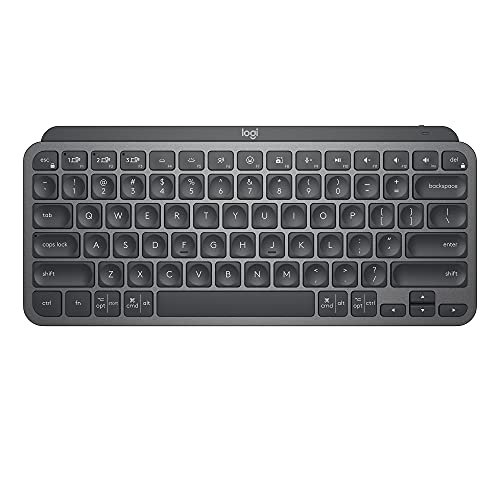
The short answer is that the Logitech K380 Multi-Device is the safest all-round pick for most people because it pairs with three devices, runs for a very long time on two AAA batteries, and works across Windows, macOS, ChromeOS, Android, and iOS. If you want a more premium typing feel with backlit keys, the Logitech MX Keys Mini is the step up. If weight matters more than anything, the Logitech Keys-to-Go 2 is the lightest mainstream option here. Budget shoppers should look at the Arteck HB030B, while typists who want a mechanical feel in a small package should look at the Keychron K3 Version 2.
Quick Picks
Our Short List of 3
All 5 Picks at a Glance
| Product | Specs | Action |
|---|---|---|
| Logitech K380 Multi-Device (B014EUQOGK) | Check price on Amazon | |
| Logitech MX Keys Mini (B098JPSVKY) | Check price on Amazon | |
 Logitech Keys-to-Go 2 (B0D2FG84F5) | Check price on Amazon | |
 Arteck HB030B (B00X5P8BJO) | Check price on Amazon | |
 Keychron K3 Version 2 (B08LSJ4RHH) | Check price on Amazon |
How to Choose
Layout and Size
Compact means different things to different makers. Some compact keyboards keep a near-standard key pitch and simply drop the number pad, while others shrink the keys themselves and tighten the spacing. Before buying, check the width and depth in the listing and compare them with the space you actually have. Also check whether the layout includes a dedicated function row and arrow keys. A 75 percent layout, such as the one on the Keychron K3 Version 2, keeps the function row and arrow keys in a tight arrangement. If you type for hours at a time, key pitch matters more than overall width. A pitch close to 19 millimeters feels familiar, while a pitch closer to 18 millimeters or less takes adjustment.
Multi-Device Pairing
One of the main reasons to choose a Bluetooth keyboard is the ability to move between devices. Several keyboards in this guide pair with three devices at once and let you switch with a key press or a dedicated button. That is useful when you write on a laptop, answer messages on a phone, and control a tablet from the same desk. Check how many devices the keyboard remembers and how switching works. A keyboard that pairs with only one device at a time, such as the Arteck HB030B, is still fine as a dedicated companion for one tablet or laptop, but it will ask you to re-pair whenever you change devices.
Key Feel and Travel
Key feel is the hardest feature to judge from a listing, so focus on the mechanism and the travel distance the manufacturer states. Scissor-switch keyboards, such as the Logitech models in this guide, have short, quiet travel and feel similar to a laptop keyboard. That makes them a good choice for shared spaces and late-night typing. Low-profile mechanical keyboards, such as the Keychron K3 Version 2, have more travel and a more tactile response, which many long-form typists prefer. The Keys-to-Go 2 uses scissor switches with about 1 millimeter of total key travel, so it feels flatter than a laptop keyboard and suits short sessions and note-taking rather than all-day drafting.
Battery Life and Charging
Battery design divides compact Bluetooth keyboards into two camps. The Logitech K380 runs on two replaceable AAA batteries and is rated for up to 24 months of use, while the Keys-to-Go 2 uses two coin-cell batteries rated for up to 36 months. Replaceable batteries mean you never wait for a charge, but you do need to keep spares on hand. Rechargeable keyboards, such as the MX Keys Mini, the Arteck HB030B, and the Keychron K3 Version 2, charge over USB and avoid disposable batteries, but they need a cable and a charging routine. Backlighting changes the equation. The MX Keys Mini is rated for up to 10 days on a full charge with the backlight on, or up to 5 months with the backlight off. The Arteck HB030B is rated for about 6 months per charge, but that figure assumes the backlight is used sparingly.
Backlighting
A backlit keyboard is a real advantage in dim rooms, on night flights, and in evening work sessions. The MX Keys Mini has smart backlighting that adjusts to ambient light and turns on as your hands approach the keys. The Arteck HB030B offers seven backlight colors with adjustable brightness, which is unusual at its level. The Keychron K3 Version 2 has a white LED backlight on the version linked here. The K380 and the Keys-to-Go 2 have no backlight at all, which is part of how they achieve such long battery life.
Weight and Portability
Weight is where compact keyboards differ most. The Keys-to-Go 2 weighs 222 grams and includes a built-in cover that protects the keys in a bag. The Arteck HB030B weighs about 167 grams, making it one of the lightest boards in this guide. The K380 weighs about 423 grams including batteries, which is still easy to carry but noticeably heavier than the ultra-flat options. The MX Keys Mini weighs about 506 grams, and its metal build is part of the reason it feels so solid on a desk, but it is the heaviest keyboard here and better suited to a bag with a laptop than to a jacket pocket.
Compatibility and Extras
Before buying, confirm the keyboard works with the devices you own. All five keyboards in this guide support Bluetooth connections to computers, tablets, and phones that accept an external keyboard, but the details vary. Some include a USB receiver as a second connection option, some support only Bluetooth, and some are tuned for a particular platform. Also look at the extras that matter to you: a built-in cover, programmable keys, or support for a companion app. The MX Keys Mini supports the Logi Options+ app on Windows and macOS for customizing keys. The Keychron K3 Version 2 supports hot-swappable switches, so the switches can be changed without soldering.
The Best Compact Bluetooth Keyboards Reviewed
Logitech K380 Multi-Device (B014EUQOGK)
The Logitech K380 Multi-Device is the default recommendation in this category for a reason. It is a compact Bluetooth keyboard that pairs with up to three devices and switches between them with the yellow Easy-Switch buttons. It works with Windows, macOS, ChromeOS, Android, iOS, and Apple TV, and it automatically maps keys to the connected device, so the shortcuts feel familiar whichever platform you are on. Logitech rates the battery life at up to 24 months on two pre-installed AAA batteries, and the keyboard measures about 10.9 inches wide by 4.9 inches deep, with a weight of about 423 grams including batteries.
Who it suits: anyone who wants one small keyboard for a laptop, a tablet, and a phone, and who values long battery life and broad compatibility over backlighting. It is a strong pick for a small desk, a shared workspace, or a bag that already carries a laptop and a tablet.
Who should skip it: anyone who types in the dark and needs backlit keys, or who prefers a rechargeable keyboard over replaceable batteries.
Logitech MX Keys Mini (B098JPSVKY)
The Logitech MX Keys Mini is the premium pick in this guide. It is a compact, minimalist wireless keyboard with backlit keys, a metal build, and Bluetooth pairing for up to three devices. It charges over USB-C and is rated for up to 10 days on a full charge with the backlight on, or up to 5 months with the backlight off. The keys use a Perfect Stroke design with a dished shape that guides the fingers, and the smart backlight adjusts to the light around you and brightens as your hands approach. It measures about 11.65 inches wide by 5.19 inches deep and weighs about 506 grams. It works with Windows, macOS, iOS, iPadOS, Android, ChromeOS, and Linux.
Who it suits: people who type for long stretches and want the most comfortable compact keyboard in this guide, especially in a home office or a coworking space. The backlighting and the solid build make it feel like a small desktop keyboard rather than a travel accessory.
Who should skip it: ultralight travelers, because at about 506 grams it is the heaviest keyboard here.
Logitech Keys-to-Go 2 (B0D2FG84F5)
The Logitech Keys-to-Go 2 is the lightest mainstream keyboard in this guide. It weighs 222 grams, measures about 250 by 105 by 8.8 millimeters, and includes a built-in cover that folds back while you type and protects the keys when the keyboard is in a bag. It pairs with up to three devices and works with Windows, Android, Linux, iPad, iPhone, Mac, and Apple TV. It uses scissor switches with about 1 millimeter of key travel and runs on two coin-cell batteries rated for up to 36 months. The full row of shortcut keys covers media playback, volume, screenshots, and brightness.
Who it suits: tablet-first users, students, and travelers who want a keyboard that adds almost nothing to a bag. It is a good fit for note-taking, email, and short writing sessions on an iPad or a phone, and the built-in cover means there is no separate case to remember.
Who should skip it: anyone who writes for hours at a time and wants deeper key travel, or who needs backlit keys.
Arteck HB030B (B00X5P8BJO)
The Arteck HB030B is the budget pick in this guide, and it is also the lightest keyboard here at about 167 grams. It is an ultra-slim Bluetooth keyboard with a 7-color backlight, adjustable brightness, and a built-in rechargeable battery rated for about 6 months per charge. It measures about 9.7 by 5.9 by 0.24 inches and works with iOS, Android, macOS, and Windows tablets, phones, and computers. It uses Bluetooth 3.0, an older standard that is less power-efficient than the newer Bluetooth versions on the Logitech boards and the Keychron.
Who it suits: budget-conscious buyers who want a thin, light keyboard with illuminated keys for a tablet or a secondary computer. It is a sensible backup keyboard for travel and a good first compact Bluetooth keyboard if you are unsure how much you will use one.
Who should skip it: anyone who needs multi-device switching, because the HB030B pairs with one device at a time.
Keychron K3 Version 2 (B08LSJ4RHH)
The Keychron K3 Version 2 is the mechanical pick in this guide. It is a 75 percent layout keyboard with 84 keys, low-profile mechanical switches, and a white LED backlight. It connects over Bluetooth 5.1 to up to three devices, or over USB-C wired mode, and it is hot-swappable, which means the switches can be replaced without soldering. It is compatible with Mac and Windows and includes a Mac and Windows switch for the key layout. The version linked here uses low-profile Keychron mechanical brown switches, which offer a tactile bump without the loud click of a clicky switch.
Who it suits: typists who want a mechanical feel in a compact, portable keyboard and who are willing to carry a slightly thicker board for the sake of key feel. It is a good fit for a small desk where the keyboard stays put most of the time but still needs to travel occasionally.
Who should skip it: anyone who wants the quietest possible keyboard for shared spaces, or the lightest board for a small bag.
What to Check Before You Buy
Start with the device you will pair most often. Confirm that the keyboard supports its operating system and that the key legends match the layout you expect, especially if you switch between Apple and Windows devices. Next, measure the space where the keyboard will live. A board that is too wide for a tray table or a small desk will spend its life in a drawer. Then decide how many devices you need to pair. Three-device switching is worth having if you move between a laptop, a tablet, and a phone, but it is unnecessary if the keyboard will live with one device.
Check the battery arrangement before you order. Replaceable batteries suit people who travel for weeks without reliable charging, while rechargeable boards suit people who keep a USB-C cable on the desk. If you choose a backlit keyboard, expect to charge it more often and keep the brightness at a comfortable level rather than the maximum. Also check the Bluetooth version in the listing. Newer Bluetooth versions generally reconnect faster and use less power, which matters when you open a tablet and expect the keyboard to be ready.
Finally, check the return terms and the warranty information on the listing. Key feel is personal, and a keyboard that looks right on paper may not suit your hands. A clear return window makes it reasonable to try a board for a week of normal typing before deciding. Keep the packaging until you are sure, and test the keyboard with every device you plan to use it with, including switching between them, before the return window closes.
FAQ
What is the most compact Bluetooth keyboard layout?
The most compact layouts drop the number pad and often tighten the function row and navigation keys. A 75 percent layout keeps the function row and arrow keys in a small footprint, while tablet-style boards such as the Keys-to-Go 2 keep a minimal layout with shortcut keys. The right layout depends on whether you need dedicated arrow keys and a function row or whether you value the smallest possible width.
Can a compact Bluetooth keyboard pair with more than one device?
Yes, several compact Bluetooth keyboards pair with three devices at once. The Logitech K380, the MX Keys Mini, the Keys-to-Go 2, and the Keychron K3 Version 2 all support three-device pairing with a switch key or button. The Arteck HB030B pairs with one device at a time, so check the listing if multi-device switching matters to you.
Are compact Bluetooth keyboards good for long typing sessions?
They can be, but the key mechanism matters. Scissor-switch boards with laptop-like travel suit most people for long sessions, and the MX Keys Mini is the most comfortable option in this guide for extended typing. Flat tablet keyboards with about 1 millimeter of travel suit short sessions better. Low-profile mechanical boards suit typists who prefer more feedback and do not mind a thicker keyboard.
Do compact Bluetooth keyboards work with tablets and phones?
Yes. All five keyboards in this guide connect to tablets and phones that support an external Bluetooth keyboard, including iPad, iPhone, and Android devices. Check the listing for the specific operating system versions supported, and confirm that the keyboard layout matches your device, since shortcut keys can behave differently across platforms.
How long does the battery last on a compact Bluetooth keyboard?
It varies widely. The Logitech K380 is rated for up to 24 months on two AAA batteries, and the Keys-to-Go 2 is rated for up to 36 months on coin-cell batteries. Rechargeable boards last for weeks or months per charge depending on backlight use. The MX Keys Mini is rated for up to 10 days with the backlight on or up to 5 months with it off, while the Arteck HB030B is rated for about 6 months per charge with sparing backlight use.
Bottom Line
The best compact Bluetooth keyboards trade a little size for a lot of portability, and the right one depends on how you type and where you type. The Logitech K380 Multi-Device is the best all-round pick for most people, with three-device pairing, broad compatibility, and a battery that lasts for months. The Logitech MX Keys Mini is the pick for comfort and backlighting, the Logitech Keys-to-Go 2 is the pick for the lightest possible bag, the Arteck HB030B is the pick for a budget backlit board, and the Keychron K3 Version 2 is the pick for a mechanical feel in a compact layout. Measure your space, count your devices, and choose the battery arrangement that fits your routine, and any of these five will make a small desk or a travel setup far easier to type on.
Disclosure: As an Amazon Associate, we may earn from qualifying purchases.