Key takeaways
- Our Lofree Flow84 review covers its low-profile 84-key design, hot-swappable switches, tri-mode wireless, the flaws buyers report, and top alternatives.
The lofree flow84 review beautiful but flawed question comes up because this keyboard is genuinely striking to look at and genuinely awkward in a few places that matter every day. The Lofree Flow84 is a low-profile, 84-key mechanical keyboard with a retro-inspired design, hot-swappable switches, and tri-mode wireless connectivity, and it earns its admirers honestly. It also carries a short list of flaws that buyers keep reporting, from limited software to a small low-profile switch ecosystem, and those flaws are the reason this review exists.
The quick answer is that the Flow84 is a strong pick for buyers who want a beautiful, compact, low-profile keyboard for typing and everyday computer work, and a weaker pick for buyers who want deep customisation, per-key RGB lighting, or a wide choice of replacement switches. Its design, slim profile, and quiet low-profile typing feel are the reasons to buy it. Its basic software, white-only backlight, and limited switch options are the reasons to pause. The alternatives below cover buyers who want the same compact shape with more programmability, or the same design-led appeal from the same brand.
This review is based on published specifications and widely reported details of the Lofree Flow84, together with the same published information for the alternatives. Nothing here is presented as first-hand testing.
Quick Picks
| Keyboard | Best For | Standout Feature |
|---|---|---|
| Lofree Flow84 | Design-led low-profile typing | Slim 84-key board with hot-swap low-profile switches |
| Lofree DOT Foundation | Same-brand 84-key alternative | Round keycaps with tri-mode wireless |
| Keychron Q1 Pro | Premium 75 percent programmability | Aluminium case with gasket mount and QMK support |
| Keychron K8 Max (Super Brown) | Full-height TKL custom board | Hot-swap QMK board with tri-mode wireless |
| Keychron K8 | Simpler Bluetooth TKL board | Proven tenkeyless design with dual-system keycaps |
How to Choose
Layout and Size
An 84-key board sits in the 75 percent class: it keeps the function row and a navigation cluster while dropping the number pad, so it saves desk space without forcing most keys onto a function layer. Before buying, check whether the layout matches the way you work. Buyers who live in spreadsheets may miss a number pad, while buyers who want a compact desk setup will find the 75 percent shape a comfortable middle ground. The Flow84 keeps a familiar key arrangement, so the adjustment period is short for most typists.
Switch Type and Feel
Low-profile switches are the defining feature of the Flow84, and they change the typing feel more than any other choice. The shorter travel and lower key height give a fast, shallow keystroke that suits typists coming from laptop keyboards, but the feel is different from a full-height mechanical switch, and some typists find it less satisfying over long sessions. The Flow84 ships with Kailh low-profile switches in tactile and linear options, and the hot-swappable sockets let owners change switches later. The catch is that the low-profile switch market is much smaller than the full-height MX-style market, so the range of replacement switches is limited.
Connectivity and Multi-Device Use
Tri-mode connectivity is now standard on boards in this class, and the Flow84 covers Bluetooth, 2.4 GHz wireless, and wired USB-C. Bluetooth suits buyers who switch between a laptop, a tablet, and a desktop, while the 2.4 GHz dongle suits buyers who want lower wireless latency for gaming. Wired USB-C is the fallback for charging and for sessions where wireless latency is a concern. Check how many devices the board can pair with over Bluetooth, and whether switching between them is a single keypress or a longer process.
Software and Customisation
Software is where the Flow84 shows its weakest side, and it deserves a hard look before buying. The board does not offer the open QMK or VIA firmware that Keychron boards in this guide provide, so remapping keys, building layers, and recording macros depends on the software Lofree supplies, which is more basic and less flexible. Buyers who never remap a key will not notice. Buyers who build custom layers or macros will notice immediately, and they should weigh the alternatives below, especially the Q1 Pro and the K8 Max.
Build, Keycaps, and Sound
The Flow84 uses a gasket-mounted design, which softens each keystroke and gives the board a quieter, more cushioned sound than a tray-mounted board. The slim case keeps the typing angle low, which suits buyers who type without a wrist rest, though the fixed angle may not suit everyone. Keycap legends deserve attention: in some colourways the legends are low-contrast and harder to read in dim light, which is a real everyday annoyance on a board bought partly for its looks. Check the colourway carefully, and remember that low-profile keycaps are harder to replace than standard-height caps.
Battery Life and Backlighting
Published specifications list a 2,000 mAh battery, which is modest next to the 4,000 mAh cells in the Keychron alternatives. Battery life depends heavily on backlight use, and the white LED backlight drains the cell faster when left on at full brightness. The backlight is white only, with no per-key RGB, which fits the retro design but disappoints buyers who want colourful lighting effects. Buyers who type with the backlight off will get far more use between charges than buyers who keep it on.
The Best Lofree Flow84 Review Beautiful but Flawed Reviewed
Lofree Flow84
The Lofree Flow84 is the board this review is about, and its appeal starts with the way it looks on a desk. The slim low-profile case, retro-inspired colourways, and tidy 84-key layout make it one of the most attractive compact keyboards in its class, and the design is the reason most buyers consider it in the first place. Under the looks, the fundamentals are solid: hot-swappable Kailh low-profile switches, a gasket mount that softens the typing feel, tri-mode Bluetooth, 2.4 GHz, and USB-C connectivity, and compatibility with Mac and Windows systems.
In everyday use, the Flow84 is a pleasant typing board for writing, browsing, and general computer work. The low-profile switches give a quick, shallow keystroke that laptop-keyboard converts take to immediately, and the gasket mount keeps the sound muted rather than clacky. The 75 percent layout keeps the function row and navigation keys within reach, so there is little relearning for typists moving from a full-size board. For a buyer who wants a beautiful daily keyboard and does not need deep programmability, the Flow84 delivers on its core promise.
The flaws are real and worth stating plainly. The software is basic, with no QMK or VIA support, so remapping and macros are limited. The white-only backlight has no RGB option, and some colourways have low-contrast legends that are hard to read. The low-profile switch ecosystem is small, so replacement switch choices are far fewer than for full-height MX-style boards, and some owners report stabiliser rattle on the larger keys. The 2,000 mAh battery is modest, and heavy backlight use shortens the time between charges. None of these flaws makes the Flow84 a bad keyboard, but together they define who should buy it: a buyer who values design and low-profile feel over customisation depth.
Note for buyers: no verified Amazon US listing link is included for the Flow84 itself in this article, because no Amazon US ASIN for the Lofree Flow84 could be verified at the time of writing. The alternatives below carry verified listing links. Buyers who want the Flow84 specifically should confirm the listing, the switch option, and the colourway with the seller before ordering.
Lofree DOT Foundation (B0CPM3NY8H)
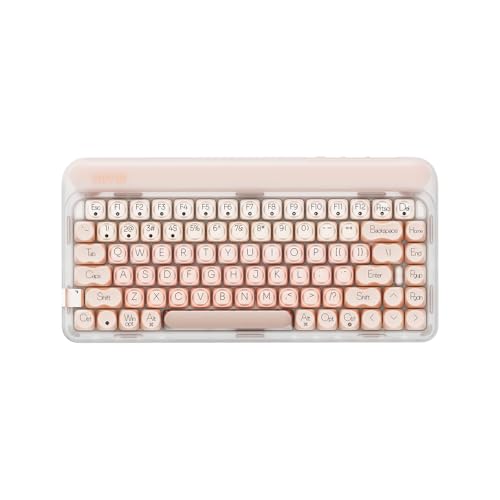
The Lofree DOT Foundation is the closest alternative for buyers who love the Flow84 idea but want a different expression of the same design-led approach. It is also an 84-key, 75 percent board from the same brand, with round keycaps that give it a typewriter-inspired look, Gateron Baby Racoon linear switches, hot-swappable sockets, and tri-mode Bluetooth, 2.4 GHz, and USB-C connectivity. It pairs with up to four devices and uses a white LED backlight, matching the Flow84 on connectivity and lighting philosophy.
The DOT Foundation suits buyers who want the Lofree aesthetic with a full-height switch feel rather than a low-profile one. The round keycaps give every press a distinct, deliberate feel, and the gasket mount softens the typing sound in the same way as the Flow84. It shares the Flow84 limits on software, with basic configuration and no remapping or macros, and its battery needs regular charging when the backlight stays on. The tall typing angle may call for a wrist rest for long sessions. It is the alternative to choose when the Lofree look is the priority and the low-profile feel is not.
Keychron Q1 Pro (B0BKGCQM7D)
The Keychron Q1 Pro is the premium alternative for buyers who like the compact 75 percent shape but want far more programmability than the Flow84 offers. It is a 75 percent keyboard with 81 keys, built around a CNC-machined aluminium case with a gasket mount, which gives it a soft, cushioned typing feel and a solid case that does not flex. It is hot-swappable, runs QMK and VIA firmware, and connects over Bluetooth 5.1, 2.4 GHz wireless, and USB-C, with double-shot PBT keycaps, south-facing RGB, and a programmable rotary knob that the Flow84 lacks.
The Q1 Pro is a partial fit for this guide because it uses full-height switches rather than the low-profile switches of the Flow84, so the typing feel and the desk profile are different, and it sits higher in the range, reflecting the aluminium case and gasket mount. What it gives back is the most customisable typing experience in this roundup, with full key remapping, layers, and macros through QMK and VIA, plus RGB lighting for buyers who want it. It is the pick for buyers who decide the Flow84 flaws matter more than its looks.
Keychron K8 Max (Super Brown) (B0DYHCM1GM)
The Keychron K8 Max is the alternative for buyers who want a full-height mechanical keyboard with genuine customisation headroom. It keeps an 87-key tenkeyless layout while adding hot-swappable switches, open-source QMK firmware, a 2.4 GHz wireless mode, and layered acoustic foam under the plate. Its tri-mode connectivity covers a low-latency wireless dongle, Bluetooth for up to three devices, and a wired USB-C connection, while QMK firmware and the web-based Keychron Launcher let owners remap keys, build layers, and record macros without installing desktop software.
Published specifications list a 4,000 mAh battery, a 1,000 Hz polling rate in 2.4 GHz and wired modes, and 90 Hz in Bluetooth mode. The board supports N-key rollover in both wireless and wired modes, and inside the case IXPE, PET, and EPDM foam layers sit under a steel plate, with double-shot PBT keycaps in the OSA profile. The case is ABS with an aluminium frame on this configuration, and the board includes a Mac and Windows system toggle plus keycaps for both systems.
The K8 Max is a partial fit for this guide because its tenkeyless layout is larger than the 84-key Flow84, and its full-height switches give a taller desk profile and a different typing feel. Buyers who need a number pad will not find one here either. What it offers in return is the deepest customisation in this roundup at a mid-range position, with a larger battery and RGB lighting the Flow84 does not provide.
Keychron K8 (B0869HSZ92)
The original Keychron K8 is the simpler alternative for buyers who want a tenkeyless mechanical keyboard with fewer features and a straightforward setup. It keeps the same 87-key layout and the same Mac and Windows toggle as the K8 Max, connects over Bluetooth 5.1 to up to three devices or over a wired USB-C connection, and ships with Gateron G Pro switches, including the Brown tactile option in this listing. Its white LED backlight is simpler than the RGB lighting of the K8 Max, and its 4,000 mAh battery is rated for up to 240 hours with the backlight off.
The trade-offs are clear. The K8 has no 2.4 GHz wireless mode, so wireless use runs over Bluetooth only, and it has no QMK firmware, so key remapping is limited compared with the K8 Max. It is also the older design, with an ABS and aluminium frame and Gateron switches rather than Keychron Super switches. It is a partial fit for this guide because its tenkeyless full-height layout is larger and taller than the Flow84. What it offers in return is a proven, straightforward board at a lower position in the range, with the same tenkeyless footprint and the same dual-system keycaps.
What to Check Before You Buy
Check the switch option first, because low-profile and full-height switches are not interchangeable, and the switch type decides the typing feel more than any other feature. Confirm the layout covers the keys you use daily, especially if you rely on a number pad or a full navigation cluster. Check the connectivity modes against your devices, and confirm how many Bluetooth pairings the board holds if you switch between machines. Read the software situation honestly: if you remap keys or build macros, a QMK or VIA board will serve you better than the Flow84. Check the keycap legends in the colourway you want, since low-contrast legends are hard to read in dim light, and remember that low-profile keycap replacements are harder to find. Finally, confirm the listing, the switch option, and the colourway with the seller before ordering, and check the return terms in case the low-profile feel does not suit you.
Frequently Asked Questions
Is the Lofree Flow84 good for typing all day?
For most typists, yes, provided the low-profile feel suits them. The shallow keystroke and low typing angle suit writers and general computer users, and the gasket mount keeps the sound muted. Typists who prefer a deep, full-height keystroke may find the shallow travel less satisfying over long sessions, and they should consider the full-height alternatives in this guide.
Does the Lofree Flow84 support QMK or VIA?
No. The Flow84 does not offer QMK or VIA firmware, and configuration depends on the software Lofree supplies, which is more basic. Buyers who need key remapping, layers, or macros should look at the Keychron Q1 Pro or the K8 Max, both of which run QMK firmware.
What switches does the Lofree Flow84 use?
The Flow84 uses Kailh low-profile switches in tactile and linear options, and the hot-swappable sockets let owners change switches later. The replacement market for low-profile switches is much smaller than for full-height MX-style switches, so the range of alternatives is limited.
Does the Flow84 work with Mac and Windows?
Yes. The Flow84 is compatible with Mac and Windows systems, and it connects over Bluetooth, 2.4 GHz wireless, and wired USB-C, which covers a laptop, a desktop, and a tablet without replugging.
Why do buyers call the Flow84 beautiful but flawed?
The beautiful part is the slim low-profile case, the retro-inspired colourways, and the tidy 84-key layout. The flawed part is the short list of everyday limits: basic software with no QMK or VIA support, white-only backlighting, low-contrast legends on some colourways, a small low-profile switch ecosystem, and a modest battery. Buyers who value design over customisation accept the trade; buyers who need programmability do not.
Bottom Line
The Lofree Flow84 earns its reputation honestly on both halves of the phrase. It is beautiful, with a slim low-profile design and a compact 84-key layout that looks right on almost any desk, and it types well for writing and everyday work thanks to its hot-swappable low-profile switches and gasket mount. It is also flawed in ways that matter, with basic software, no QMK or VIA support, white-only backlighting, and a small switch ecosystem. Buyers who want a design-led daily keyboard and never remap a key will enjoy it. Buyers who want deep customisation should take the same budget to the Keychron Q1 Pro, and buyers who want the same brand with a full-height feel should look at the Lofree DOT Foundation. Check the listing, the switch option, and the colourway before ordering, and keep the return terms in mind.
Disclosure: As an Amazon Associate, we may earn from qualifying purchases.