Our Short List of 3
All 4 Picks at a Glance
| Product | Specs | Action |
|---|---|---|
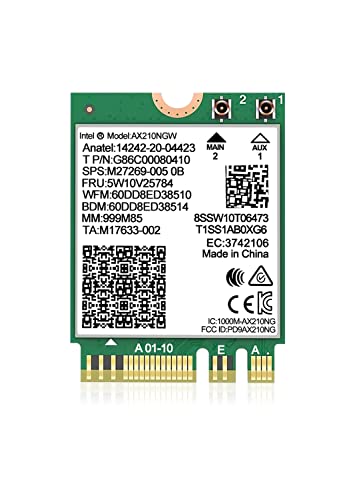 NICGIGA Intel AX210 NGW | Check price on Amazon | |
 NETGEAR Nighthawk A8000 | Check price on Amazon | |
 TP-Link Archer TX30U Plus | Check price on Amazon | |
 TP-Link Archer T3U Plus | Check price on Amazon |
Key takeaways
- Find the best gaming WiFi card for laptops: Wi-Fi 6E M.2 upgrades and USB adapters compared for lower latency, faster speeds, and stable, smooth online play.
A gaming laptop lives or dies by its connection. A single lag spike can cost a ranked match, and a weak signal can turn a fast internet plan into a slideshow. The best gaming WiFi card for laptops fixes the weakest link in that chain, whether that means swapping the internal wireless module for a newer standard or plugging in a high-performance USB adapter that bypasses a tired built-in radio altogether.
This guide compares five wireless upgrades that fit gaming laptops: internal M.2 cards for owners comfortable opening the chassis, and USB adapters for anyone who wants a plug-and-play fix. Every pick below is a Wi-Fi card or wireless adapter of the same type as the keyword, with speeds, bands, and compatibility taken from manufacturer listings and retailer specifications. No live stock check is claimed here, because Amazon product pages could not be opened directly at the time of writing; each ASIN was corroborated through Amazon search-index results plus an independent source.
At a Glance
| Product | Best For | Key Spec |
|---|---|---|
| NICGIGA Intel AX210 NGW | Best overall M.2 upgrade | Wi-Fi 6E tri-band, up to 5400 Mbps, Bluetooth 5.3 |
| Intel Wi-Fi 6 AX200 | Reliable Wi-Fi 6 swap | Wi-Fi 6 dual-band, up to 2.4 Gbps, Bluetooth 5.0 |
| NETGEAR Nighthawk A8000 | Best plug-and-play Wi-Fi 6E | AXE3000 tri-band USB 3.0, up to 3 Gbps |
| TP-Link Archer TX30U Plus | Best Wi-Fi 6 USB value | AX1800, 1201 Mbps on 5 GHz, dual high-gain antennas |
| TP-Link Archer T3U Plus | Budget USB upgrade | AC1300, 867 Mbps on 5 GHz, adjustable high-gain antenna |
How to Choose a Gaming WiFi Card for Laptops
Start with the form factor. An internal M.2 card replaces the wireless module already inside the laptop, so it adds nothing to the outside of the machine and travels with it everywhere. That is the cleanest option for a daily-driver gaming laptop, but it requires opening the bottom panel, removing one small screw, and reconnecting two tiny antenna wires. A USB adapter needs no tools at all: plug it in, install the driver, and the laptop has a new radio. The trade-off is a dongle sticking out of a USB port, which matters more on a laptop that moves around than on one that mostly sits on a desk.
Next, match the wireless standard to the router. Wi-Fi 6E adds the 6 GHz band, which is far less crowded than the 2.4 GHz and 5 GHz bands that every neighbor’s network shares. On a Wi-Fi 6E router, a 6E card can deliver lower latency and steadier throughput during busy evening hours. Wi-Fi 6 without the 6 GHz band still brings real gaming benefits over older Wi-Fi 5 hardware, including OFDMA and MU-MIMO, which let the router serve several devices at once instead of queuing them.
Check the slot and the chipset before buying an internal card. Most gaming laptops use an M.2 2230 Key A or Key E slot for the wireless module, and the Intel AX210 and AX200 cards in this guide are built for exactly that socket. Some newer Intel laptops use a CNVio2 interface instead, which needs a different card such as the AX211, so confirm the slot type in the laptop manual or by looking at the existing module. Also check whether the laptop has a BIOS allowlist that restricts which wireless cards it accepts.
Antenna design matters more than the headline speed number. Internal cards rely on the laptop’s built-in antennas, which are routed through the display lid and usually perform well. USB adapters with external high-gain antennas can pull in a weaker signal from across the house, which helps when the router sits two rooms away. A cradle or a long adjustable antenna also lets the adapter sit away from the laptop body, reducing interference from the machine itself.
Finally, weigh Bluetooth and driver support. A modern card doubles as the laptop’s Bluetooth radio, so a Bluetooth 5.3 module improves controller and headset connections alongside Wi-Fi. Windows 10 and Windows 11 cover the Intel cards in this guide with drivers from Intel, while USB adapters from TP-Link and NETGEAR ship with their own installers. Confirm operating system support before ordering, especially on Linux or older Windows builds, where some adapters have limited driver coverage.
Product Reviews
NICGIGA Intel AX210 NGW
The NICGIGA AX210 NGW is a genuine Intel AX210 module packaged as a straightforward laptop upgrade, and it is the strongest all-around pick in this guide. It is an M.2 2230 card with a Key A or Key E connector, built around Intel’s Wi-Fi 6E chipset, and it covers all three bands: 2.4 GHz, 5 GHz, and the newer 6 GHz band. Combined throughput is rated up to 5400 Mbps, split as 2400 Mbps on 6 GHz, 2400 Mbps on 5 GHz, and 574 Mbps on 2.4 GHz, with 160 MHz channels, OFDMA, and MU-MIMO keeping latency low when the network is busy.
Bluetooth 5.3 is integrated, so the same module handles wireless headsets, controllers, and peripherals with a newer, more efficient Bluetooth stack than older cards offer. The card works with Windows 10 and Windows 11 in 64-bit editions, using Intel drivers, and it reuses the laptop’s existing antenna wires, which keeps the install clean and preserves the machine’s original look.
This is the card to choose when the goal is a full generational jump: a laptop stuck on Wi-Fi 5 or an early Wi-Fi 6 module gains the 6 GHz band, faster peak speeds, and a modern Bluetooth radio in one swap. The main limitation is that it is an internal upgrade, so it is only an option for laptops whose wireless module is removable and whose BIOS does not block third-party cards.
Pros:
– Full Wi-Fi 6E tri-band support with the uncongested 6 GHz band
– Up to 5400 Mbps combined throughput with 160 MHz channels
– Bluetooth 5.3 for headsets and controllers
– Standard M.2 2230 size fits most gaming laptops
Cons:
– Requires opening the laptop and reconnecting antenna wires
– No good for laptops with a soldered wireless module or a BIOS allowlist
Intel Wi-Fi 6 AX200
The Intel Wi-Fi 6 AX200 is the retail version of the module that shipped in a huge number of gaming laptops, which makes it one of the safest replacement cards available. It is an M.2 2230 module with a Key A/E connector, built on the 802.11ax Wi-Fi 6 standard, with dual-band coverage on 2.4 GHz and 5 GHz and a maximum speed of 2.4 Gbps on a 160 MHz channel. It uses 2×2 MU-MIMO, supports OFDMA and 1024-QAM, and includes Bluetooth 5.0 for wireless peripherals.
What makes the AX200 appealing is its broad compatibility. It works in the standard M.2 wireless slot found in most Intel and AMD gaming laptops, it does not need the CNVio interface that limits the newer AX201 and AX211 cards, and Intel supplies drivers for Windows 10 and Windows 11. Community reports from laptop owners, including HP support threads, consistently point to the non-vPro retail version as the correct variant for a direct swap, since some laptops reject the vPro version.
Pros:
– Extremely broad laptop compatibility with a standard M.2 slot
– Wi-Fi 6 with 160 MHz channels, OFDMA, and MU-MIMO
– Retail non-vPro version widely documented as a direct swap
– Lower cost than Wi-Fi 6E modules
Cons:
– No 6 GHz band, so no Wi-Fi 6E support
– Bluetooth 5.0 rather than the newer 5.3 standard
NETGEAR Nighthawk A8000
The NETGEAR Nighthawk A8000 is the simplest way to add Wi-Fi 6E to a gaming laptop without opening anything. It is a USB 3.0 adapter built on the AXE3000 standard, with tri-band coverage across 2.4 GHz, 5 GHz, and 6 GHz and speeds up to 3 Gbps. NETGEAR describes it as the first Wi-Fi 6E USB adapter, designed to upgrade notebook and desktop PCs to the latest wireless standard with a simple plug-in, and it works with any Wi-Fi 6 or Wi-Fi 6E router or mesh system.
The adapter measures 93 by 31.4 by 14.45 mm and weighs 28 grams, and it ships with a desktop cradle and cable so it can sit on the desk instead of hanging off the laptop’s side. That cradle is a genuine gaming advantage: placing the adapter away from the laptop body and closer to line of sight with the router can improve signal quality in a way a flush dongle cannot. It supports Windows 10 and Windows 11, with setup through NETGEAR’s installer.
Pros:
– Adds Wi-Fi 6E to any laptop with a USB 3.0 port, no disassembly
– Tri-band AXE3000 with the 6 GHz band for less congestion
– Included cradle improves placement and signal quality
– Works with Wi-Fi 6 and Wi-Fi 6E routers and mesh systems
Cons:
– Occupies a USB port and sticks out when used without the cradle
– Windows only, with no macOS or Linux support listed
TP-Link Archer TX30U Plus
The TP-Link Archer TX30U Plus is a Wi-Fi 6 USB adapter built for gamers who want strong reception at a distance. It is rated AX1800, with up to 1201 Mbps on the 5 GHz band and 574 Mbps on the 2.4 GHz band, and it uses two adjustable high-gain antennas with beamforming to focus the signal toward the router. OFDMA and MU-MIMO share airtime efficiently across devices, which helps keep ping stable when other people in the house are streaming or downloading.
The adapter connects over SuperSpeed USB 3.0 and carries a preloaded internal driver, so installation on Windows 11 or Windows 10 is a matter of plugging it in and letting the driver load, with no disc or download needed for the first setup. WPA3 encryption is supported for networks that offer it, and TP-Link backs the adapter with a two-year manufacturer warranty. The two antennas fold and rotate, so they can be angled for the best signal and folded flat for storage in a laptop bag.
This is the pick for a gaming laptop that sits far from the router, where the high-gain antennas earn their keep. It does not have a 6 GHz band, so it is a Wi-Fi 6 adapter rather than a Wi-Fi 6E one, and it supports Windows 11 and Windows 10 only.
Pros:
– Dual high-gain antennas with beamforming for better range
– Wi-Fi 6 with OFDMA and MU-MIMO for lower latency
– Preloaded driver makes setup quick on Windows 11 and 10
– WPA3 encryption and a two-year warranty
Cons:
– No 6 GHz band, so no Wi-Fi 6E support
– Windows 11 and 10 only, with no macOS or Linux support
TP-Link Archer T3U Plus
The TP-Link Archer T3U Plus is the budget rescue option in this guide: a USB 3.0 adapter that gives an aging gaming laptop a working dual-band radio for a modest outlay. It is rated AC1300, with up to 867 Mbps on the 5 GHz band and 400 Mbps on the 2.4 GHz band, and it uses a single adjustable high-gain antenna rated at 5 dBi to pull in signals that a weak internal card would drop. MU-MIMO is supported, and the antenna rotates through 180 degrees to find the best angle.
The adapter is a compact dongle with a long foldable antenna, measuring roughly 57.8 by 18 by 173.4 mm with the antenna extended. It works with Windows 11, 10, 8.1, 8, 7, and XP, as well as macOS 10.9 through 10.15, which makes it the most broadly compatible adapter here for older machines. On a laptop whose internal antennas are damaged or whose built-in card has weak reception, the external antenna can be the difference between a playable connection and constant disconnects.
The T3U Plus is a Wi-Fi 5 adapter, so it cannot match the speed or latency features of the Wi-Fi 6 and 6E picks above, and it is not the right choice for a modern gaming laptop that deserves a faster radio. But as a low-cost fix for a laptop with a dead or dying wireless card, or as a spare adapter to keep in a bag for LAN nights, it is a practical and proven option.
Pros:
– High-gain 5 dBi antenna improves reception at a distance
– Very broad operating system support, including older Windows and macOS
– Compact dongle with a folding antenna for portability
– Low-cost way to revive a laptop with a failing wireless card
Cons:
– Wi-Fi 5 only, with no Wi-Fi 6 features or 6 GHz band
– Single antenna and lower top speed than the other picks here
Which One Fits You
The right choice depends on the laptop and the router, not on the headline speed alone. If the laptop has a removable M.2 wireless module and the router supports Wi-Fi 6E, the NICGIGA AX210 is the best overall upgrade: it adds the 6 GHz band, Bluetooth 5.3, and the fastest speeds in this guide while staying invisible inside the chassis. If the router is Wi-Fi 6 or older, or the laptop is a few years old, the Intel AX200 delivers nearly all of the practical gaming benefit at a lower cost and with the widest compatibility.
For laptops that cannot take an internal card, the USB adapters cover every situation. The NETGEAR Nighthawk A8000 is the only plug-and-play route to Wi-Fi 6E, and its cradle makes it the best choice for a laptop that mostly stays on a desk. The TP-Link Archer TX30U Plus is the better pick for a Windows laptop far from the router, where its dual high-gain antennas and Wi-Fi 6 features keep the connection steady. The Archer T3U Plus is the budget answer for an older machine that needs a working radio rather than a flagship upgrade.
Frequently Asked Questions
Can I replace the WiFi card in any gaming laptop?
Most gaming laptops use a removable M.2 2230 wireless module, but some have the wireless chip soldered to the motherboard or restrict replacements through a BIOS allowlist. Check the laptop manual or open the bottom panel to confirm the module is removable before ordering an internal card. If it is not removable, a USB adapter is the correct upgrade path.
Is Wi-Fi 6E worth it for gaming?
Wi-Fi 6E adds the 6 GHz band, which is much less crowded than 2.4 GHz and 5 GHz, so it can reduce interference and keep latency steadier during busy hours. It is worth it when the router also supports Wi-Fi 6E. On a Wi-Fi 6 or older router, a Wi-Fi 6E card works as a Wi-Fi 6 card, so the extra band goes unused.
What is the difference between the Intel AX210 and AX200?
The AX210 is a Wi-Fi 6E card with tri-band coverage including 6 GHz, up to 5400 Mbps combined throughput, and Bluetooth 5.3. The AX200 is a Wi-Fi 6 card with dual-band coverage, up to 2.4 Gbps, and Bluetooth 5.0. Both use the M.2 2230 Key A/E form factor, and the AX200 is the more broadly compatible choice for older laptops.
Do USB WiFi adapters work well for gaming?
A good USB 3.0 adapter with Wi-Fi 6 or 6E support can deliver low-latency gaming, especially when it has external antennas or a cradle that improves placement. The key is using a USB 3.0 port, since a USB 2.0 port limits throughput, and keeping the adapter clear of interference from other devices.
Will a new WiFi card fix lag in online games?
A new card can fix lag caused by a weak or outdated wireless radio, such as dropped packets, poor reception, or missing Wi-Fi 6 features. It cannot fix lag caused by a slow internet plan, a congested network, or a distant game server. If the wired connection is fast but the wireless connection is not, the wireless card is a likely culprit.
Do I need to install drivers for these cards?
Yes. Internal Intel cards use drivers from Intel’s download center, and Windows Update often supplies a working driver automatically. USB adapters from TP-Link and NETGEAR include their own drivers, with the Archer TX30U Plus carrying a preloaded driver that installs when the adapter is plugged in. Always use the latest driver from the manufacturer for the best stability.
Conclusion
The best gaming WiFi card for laptops is the one that matches the machine and the network it will serve. The NICGIGA Intel AX210 leads for a full Wi-Fi 6E upgrade inside a compatible laptop, the Intel AX200 is the dependable Wi-Fi 6 replacement, and the NETGEAR Nighthawk A8000, TP-Link Archer TX30U Plus, and TP-Link Archer T3U Plus cover every USB scenario from flagship 6E to budget rescue. Pick the form factor first, match the wireless standard to the router, and the lag caused by an old radio disappears.
Disclosure: As an Amazon Associate, we earn from qualifying purchases.